Product & Design Lead, PropTech, 2025
RentRedi
A navigation rebuilt around what landlords do.
RentRedi is a property management platform for independent landlords: rent collection, maintenance, tenant screening, lease management. It had every feature landlords needed, but years of fast growth had left them loosely connected and hard to navigate.
- Client
- RentRedi
- Role
- Product & Design Lead, hands-on
- Team
- Led 3 product designers, 1 from RentRedi and 2 from Wandr Studio
- Scope
- Product strategy, research, structure, design system, mobile and web
- Timeline
- 4 months, 2025
- Scale
- 100,000+ active rental properties today
- Live at
- rentredi.com
- −⅓Support ticketsSupport volume dropped by roughly a third in the three months after launch.
- 5 → 1Clicks to invoices and rentOne example of many: information that sat five clicks deep became one click away.
- 40,000First rollout, zero complaintsThe first 40,000 users moved to the new structure, and the team received no complaints.
Overview
The navigation had grown feature by feature, layered over time rather than designed end to end.
Payment flows were buried. The support queue reflected it. I mapped the structural issues, defined the new structure and navigation model, and led the team through the full visual redesign.
-
Support tickets as signal
Every ticket was a user telling us exactly where something wasn't working. The queue had never been read as research.
-
Structure
One structural decision, where navigation lives and how it behaves, changed how the whole product felt.
-
Unified platform
Rent, maintenance, leases and screening now sit in one connected product, and landlords get a single view of their portfolio.
The problem
The support tickets were the research.
RentRedi had grown by listening to users. Every request was built. Over time the product could technically do most things. What it hadn't yet had was a chance to step back and ask whether all of it held together as an experience.
I started with an audit of the product and then used AI to analyse every support ticket, categorise them and set priorities. I went to the tickets because they were the most honest signal available: every “how do I do this?” pointed at navigation, and every “where is that?” pointed at structure.
What existed
- Navigation organised by feature
- Payment status buried in submenus
- No portfolio-level overview
- Disconnected modules
- Onboarding with no guidance
What users needed
- Navigation by landlord workflow
- Payment status front and centre
- Dashboard: who paid, what's overdue
- One unified platform
- A clear path from day one
The audit confirmed where things were breaking. What it changed was the size of the answer: we planned incremental changes and ended up recommending a structural rebuild.
The audit
What the old product revealed.
-
~20 items in a menu that covered the page
The menu opened as a drawer over the content, with every feature the product had ever added at the same level: Help and a referral offer sat next to Rent, Accounting and Properties. Closed, it became a column of unlabelled icons. Nothing indicated what mattered most.
-
Menus organised by system module
Menu items mapped to system modules, while a landlord's tasks cut across them. “Payments”, “Units” and “Tenants” sat in separate buckets, even though a landlord moves between them in a single task.
-
No portfolio-level overview
There was no dashboard, so seeing who had paid or what was overdue meant opening separate sections.
-
Primary actions buried
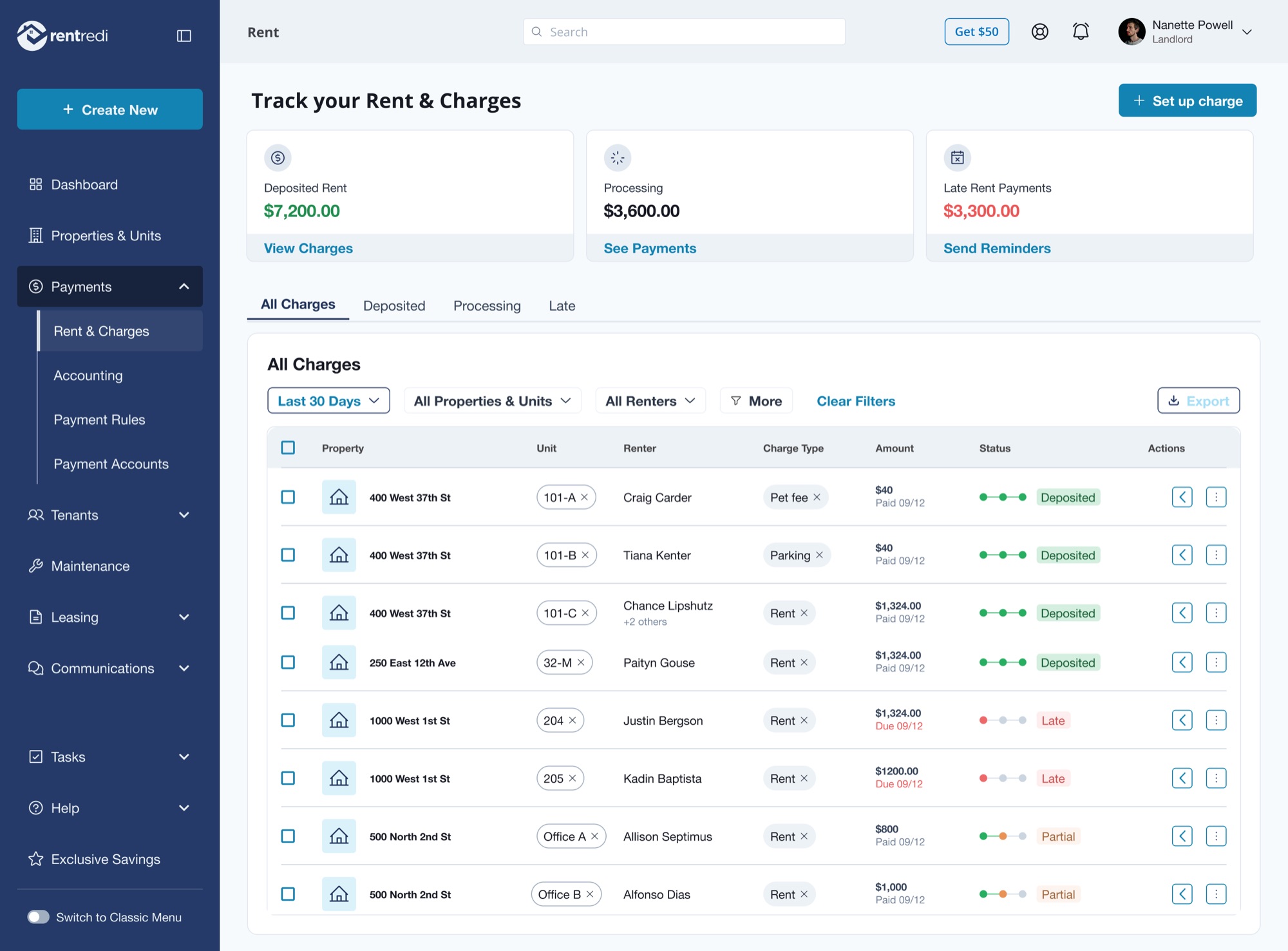
Collecting rent, the most critical action in the product, required multiple steps through sub-navigation. Seeing invoices and rent information, for example, took five clicks. Nothing on screen told users what to do first.
-
No visual hierarchy
Everything had equal weight. Overdue payments competed visually with low-priority items. The screen gave no signal about what actually needed attention.
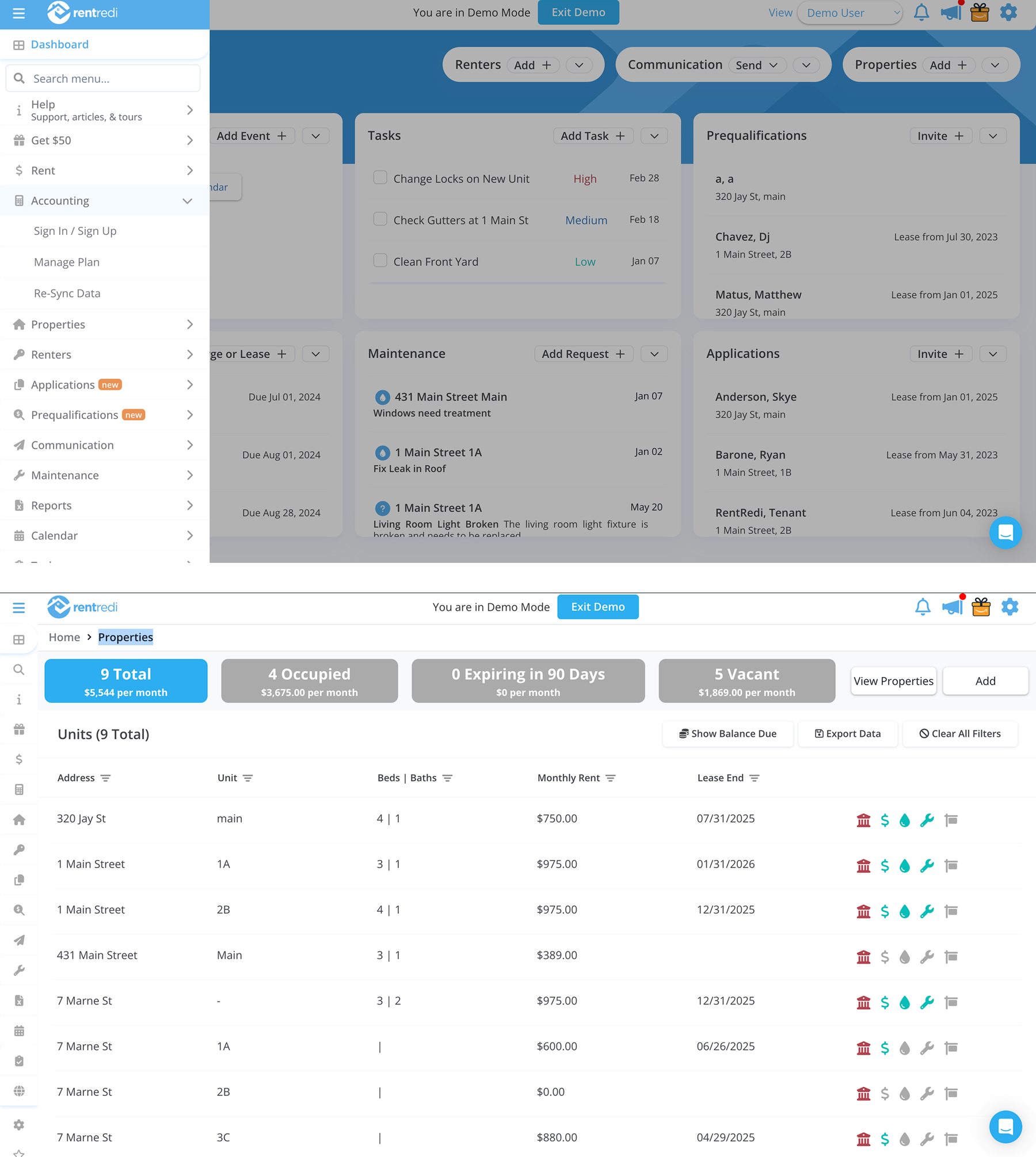
Before the redesign
The audit surfaced more than these. Five problems were enough to make the case for a complete rethink.
The decision
The decision that took the most convincing was a persistent, labelled side navigation.
The initial approach was incremental: small improvements across existing sections. Once we mapped the full navigation audit, it became clear the structure itself needed to change first.
That change needed sign-off from the Head of Product and the CEO, and the ticket analysis is what got it. It also meant saying no: iterations from RentRedi's in-house design kept leading back to the same pain points, and part of my job was showing the CEO what would happen if we shipped them, and why.
Redesigning the structure meant touching everything: navigation, routing, hierarchy, onboarding. It was a bigger scope. But building on top of the existing structure without addressing the foundation would have meant paying the same cost again in six months.
A cosmetic fix would have shipped faster without solving the underlying problem.
The redesign
What changed.
-
Persistent side navigation
The drawer and the icon rail became one fixed, labelled nav that anchors every screen. Users can always see where they are and get back without losing context.
-
Dashboard as the entry point
The first screen is the state of the portfolio. Landlords see who paid and what's overdue as soon as they log in.
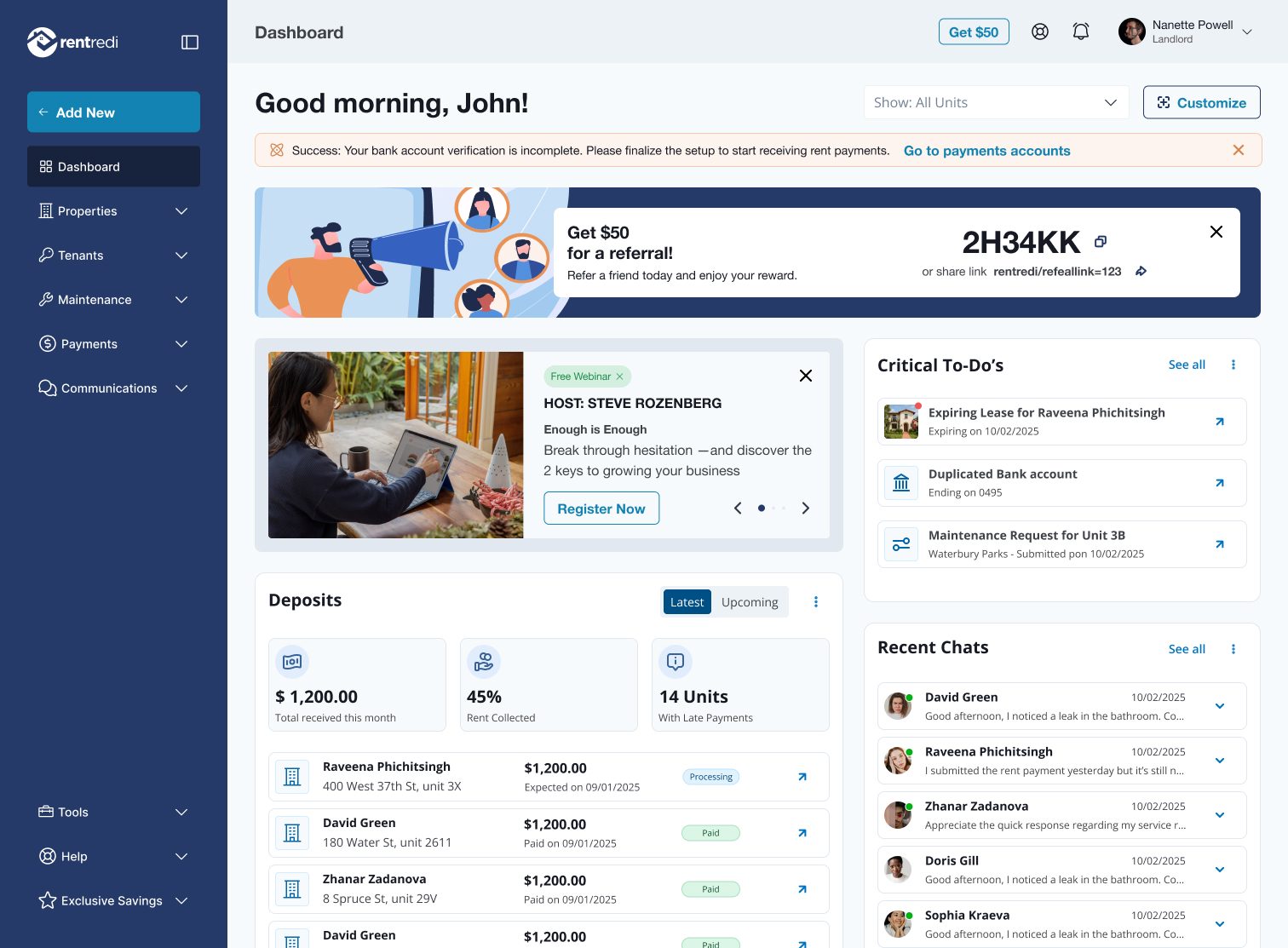
After the redesign: the dashboard -
About 20 items down to six groups
Properties & Units, Payments, Tenants, Maintenance, Leasing and Communications. Everything to do with money now lives under Payments: rent and charges, accounting, payment rules and payment accounts. Help, tasks and offers moved to the bottom, out of the way of the daily work.
-
Visual hierarchy restored
Overdue payments and urgent maintenance surface at the top; the rest waits below. The screen communicates priority without users having to search for it.
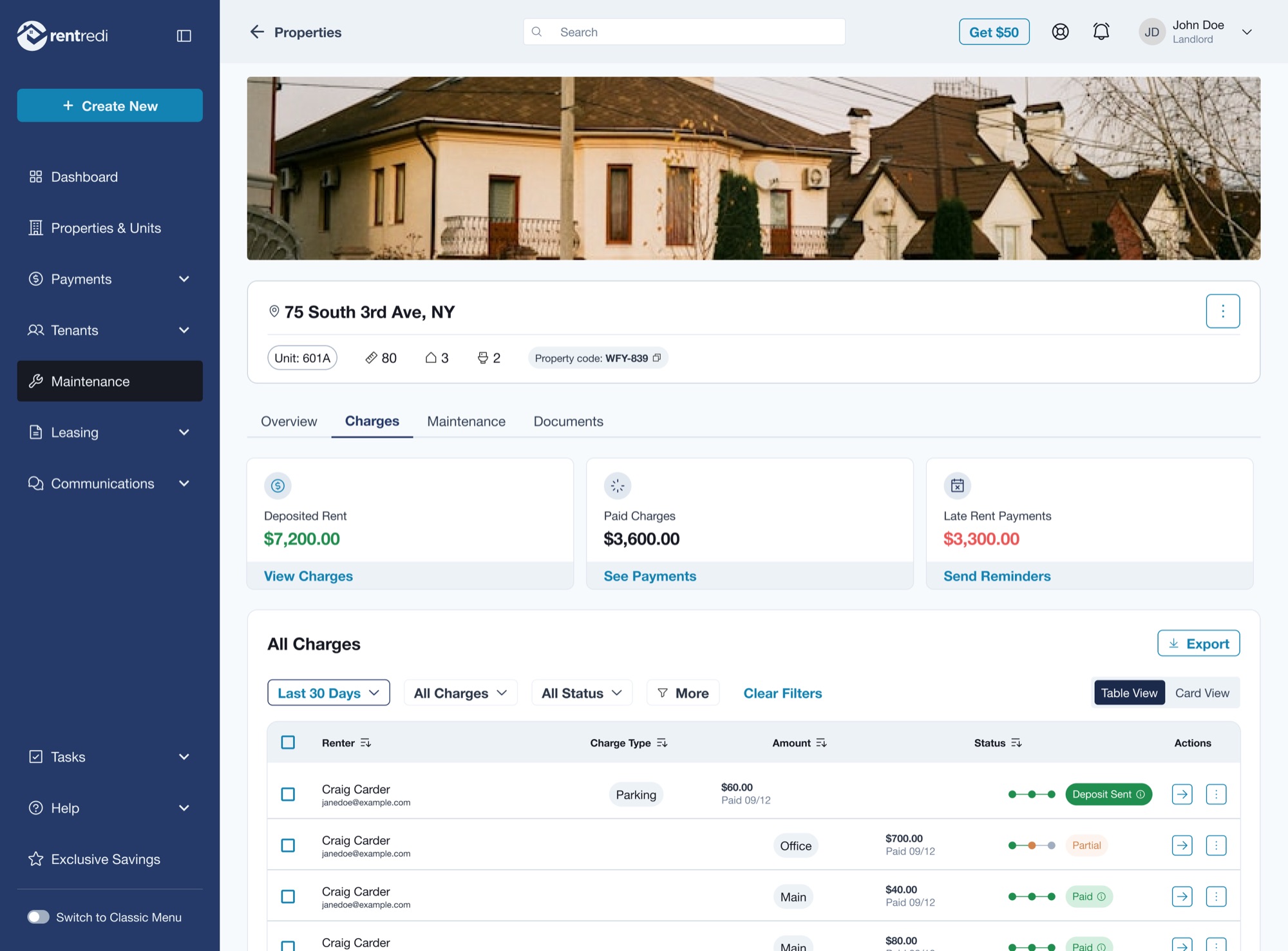
A property, charges first
Rollout
40,000 users. Zero complaints at rollout.
The new structure went out as a beta first, and nothing in the architecture had to change after it.
“We just rolled out the new IA, and not a single complaint. That never happens. The architecture Raquel defined gave us something we hadn't had before: a product that actually makes sense to the people using it.”
Reflection
“Five clicks to rent became one, and the architecture didn't change after beta.”
The tickets showed where users got stuck, how often and in what pattern, which a usability test alone wouldn't have. That density of signal made the diagnosis clear, and a clear diagnosis made the argument for a structural rethink hard to push back on.
Once the case for a new structure was made, every later decision had an anchor: does this serve the underlying logic or fight it?
The harder part was convincing a team mid-flight to stop, rebuild the foundations and trust that a slower start would finish faster. That only works with data, and the ticket data made the case for me.
RentRedi had a PM and a Head of Product. I brought the diagnosis and the structural model, they brought the constraints, and we iterated until the model worked within them.
What I would change: I would use a tool like Claude Code to get to a real, working prototype sooner, and spend less time on visuals and static prototypes.